


Rush Rally 3
4.7838.00 Reviews
App Specs
- Version
- 1.185
- Updated On
- License
- $5.99
- Downloads
- 500,000+
- Developer
- Brownmonster Limited
- Categories
- Racing
- Platform
- Android, iOS
Screenshots
 Analysis by AppCompare
If you're a racing enthusiast like me, you're always on the lookout for the next best thing in mobile gaming. Enter Rush Rally 3, a game that promises to bring console-quality racing to your pocket. After spending some time with it, I have to say, it's a wild ride that lives up to the hype.
A rally game for people who want more than a quick lap
What makes this racer a more interesting choice than a typical arcade driving game is the way it asks you to pay attention to the surface beneath the wheels. Rally driving is not simply about holding the accelerator and steering through a corner: gravel, snow, and changing conditions make each correction matter. I find that gives short sessions a useful sense of purpose. Even when I only have time for one event, I can focus on a specific skill, such as braking earlier or avoiding a series of overcorrections.
That difference also helps set expectations. If you want instant, exaggerated drifting and a forgiving track that lets you recover from every mistake, a more arcade-focused racer may suit you better. Rush Rally 3 is more rewarding when I treat it as a driving challenge and accept that a messy corner can cost time. The payoff is that improvement feels earned rather than handed over by a generous assist system.
Readability and navigation in the middle of a race
Racing interfaces have to communicate quickly: the player is watching the road, judging a turn, and making a control input at the same time. Here, I would think about screen size and personal comfort before settling on a control layout. A phone can make the road feel immediate, but it also leaves less room for fingers and visual information than a tablet. If small on-screen elements are difficult for you to pick out, try a larger display where possible and test the layout before committing to a long session.
I also recommend approaching the menus with a clear goal rather than tapping through everything at once. Start with a short event, check how the controls feel, then explore the broader career and customization options. That simple sequence makes it easier to learn what matters to you without confusing menu familiarity with driving skill. For someone who mainly wants a quick race, the best measure is whether the route into an event feels comfortable and repeatable on their device.
The game is made by Brownmonster Limited and is a paid racing title, priced at $2.99, with optional in-app purchases ranging from $0.99 to $2.99 per item. That structure is worth understanding before downloading: the initial purchase is not the same thing as a free trial, and the extra purchases are a separate consideration. I would decide on the base game first and treat optional spending as something to review deliberately, not as a requirement for enjoying a race.
Handling, sound, and ways to play
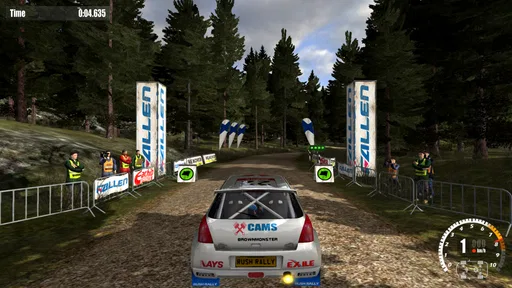
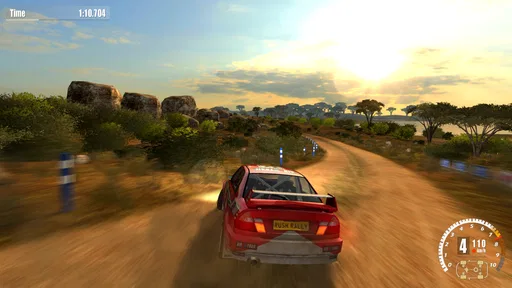
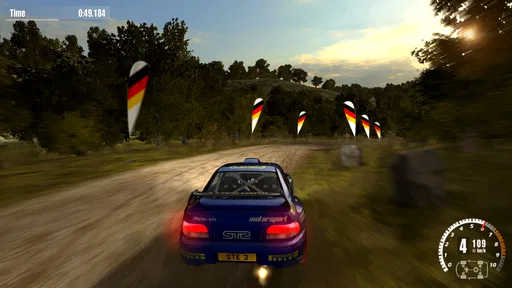
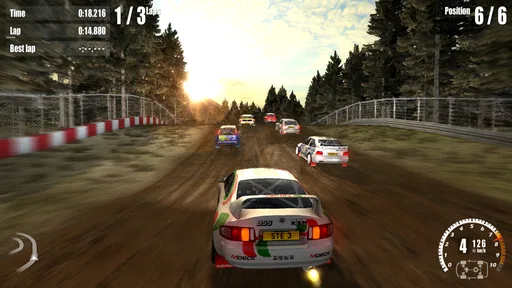
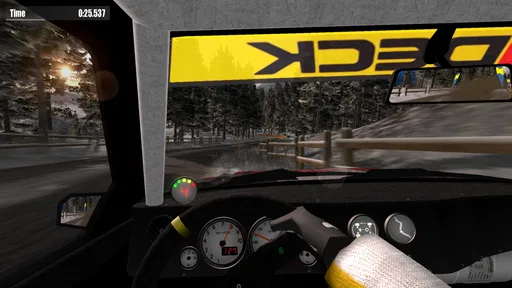
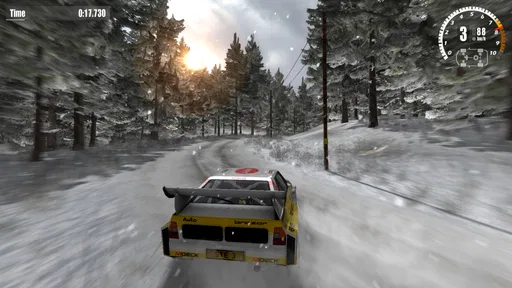
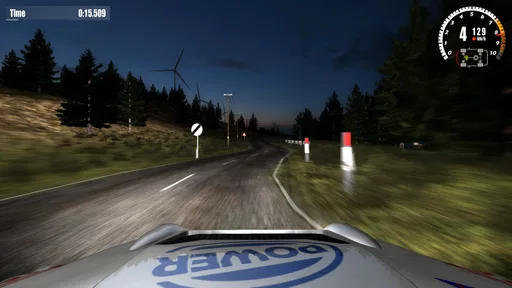
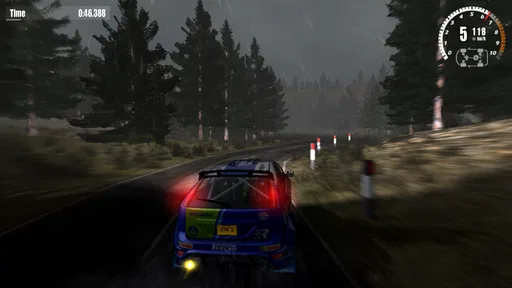
The first thing that hits you when you fire up Rush Rally 3 is the graphics. Seriously, I was blown away by how detailed everything looks. From the glistening wet tracks to the intricate details on each car, it feels like you're in a real rally environment. The developers really went above and beyond to deliver a visually stunning experience on both Android and iOS.
Worth Reading Before You Choose

Flipboard Shows What News Apps Must Do Beyond the Feed

Switching to Android Auto Means Rethinking Your Driving Routine

Google Calendar Makes a Crowded Week Easier to Manage

Ludo King Makes the Most of the Minutes Between Plans

Baby Panda World Brings Quick Play to Modern Phones, but Its Game Library Feels Busy

ESPN’s Live Game View Makes Following Close Games Easier
Gameplay and Controls
Now, let's talk about the gameplay. The controls are super responsive, which is crucial for a racing game. You can choose between a variety of control options, whether you prefer tilt, touch, or even a gamepad if you have one handy. I personally went with the touch controls, and they felt intuitive and precise.
The game offers a realistic rally experience with different surfaces like gravel and snow, affecting the handling of your car. It's challenging but in a good way. You actually feel like you're learning and improving as you play, which is super rewarding.
Using the controls to fit the moment
One practical tip is to test your preferred input in a low-pressure event before using it for a longer career session. Tilt steering can feel natural if I have room to hold and turn the phone, but it may be awkward on a crowded commute or when I need to keep the device steady. Touch controls avoid that wrist movement, while a gamepad can be a better fit for someone who already finds physical buttons easier to judge. None is automatically best; comfort and consistency matter more than choosing the most involved setup.
There is a real trade-off between immersion and control. I like the directness of touch input, but fingers can cover part of the screen, and quick corrections may feel less precise if the phone is small or my grip shifts. A controller can free up the display, yet it means carrying another accessory and having a suitable place to use it. If I am playing in a waiting room, touch is the simpler choice; at home, I might prefer to take the time to settle into a controller setup.
Game Modes Galore
One of the standout features of this app is the variety of game modes available. Whether you're in the mood for a quick race or a full-fledged career mode, Rush Rally 3 has got you covered.
- Career Mode: Dive into a comprehensive career mode that lets you start from the bottom and work your way up to becoming a rally legend. It's detailed and gives you the chance to upgrade and customize your cars.
- Rally Cross: If you're looking for something quick and intense, Rally Cross offers short, thrilling races against AI opponents.
- Time Trials: This mode is all about beating the clock. It's perfect for those who love to challenge themselves and see how they stack up against global leaderboards.
Choosing a mode that suits your time and focus
The modes serve different moods, so I would not approach them as interchangeable. A short Rally Cross race fits a narrow break because it gives me a contained challenge. Time Trials work better when I want to repeat a route and compare my own attempts; they reward patience and consistency more than a single lucky run. Career mode is the longer commitment, especially if I enjoy gradually improving a car and working through progression rather than jumping between unrelated races.
For a useful practice routine, I would pick one surface or one type of corner to pay attention to, then use repeated attempts to see whether my approach is actually improving. That makes a time trial more informative than simply chasing a leaderboard position. It also gives newer players a way to build confidence without feeling that every race has to be a perfect result. If all you want is a casual distraction with no interest in learning the handling, the career structure and driving demands may feel like more work than fun.
Sound Design
Don't even get me started on the sound design. The roar of the engines, the crunch of gravel under your tires, and the ambient sounds of the environment all come together to create an immersive experience. It's like ASMR for racing fans!
Motor and sensory considerations
Rally games ask for repeated, quick decisions, so the best setup is the one that lets you steer without strain. If tilting a device is uncomfortable, touch or a gamepad gives you another way to play. If precise finger movement is difficult, a physical controller may feel more manageable, provided you already have one and can use it comfortably. I would try each available control option in a short session rather than assuming that the default will suit every hand or posture.
Sound adds character, but an engine-heavy mix may not be pleasant in every setting or for every player. Playing at a lower volume or muting the game can make it easier to use in a shared space; the trade-off is losing some of the engine and surface cues that help create the rally atmosphere. Headphones can keep sound more private, though they are not a great choice when I need to hear what is happening around me. These are ordinary practical compromises, not a substitute for individual accessibility needs.
Multiplayer Madness
If going solo isn't your thing, Rush Rally 3 has got you covered with its multiplayer mode. You can race against friends or go head-to-head with players from around the world. The matchmaking is smooth, and I didn't experience any lag, which is a big plus.
Where multiplayer fits—and where it does not
Multiplayer is most appealing when I want a shared challenge rather than a predictable solo run. It can make a familiar car and course feel fresh because another person is less predictable than the AI. But it is not the mode I would choose when my connection is unreliable, I only have a minute to spare, or I want to pause and learn at my own pace. Solo events are the more practical option in those situations, while multiplayer makes more sense when I can give a race my full attention.
For an everyday example, I might open the game during a quiet break at home, run a short event, and use the result to decide whether to practise a corner or return to career progression. If I am on public transport, I would first consider whether I can hold the phone securely and keep enough attention for a fast driving game. A race is a poor fit when I need to watch a stop, listen for an announcement, or keep one hand free. A pause in the day does not automatically make it a suitable moment to race.
Customization and Upgrades
What's a racing game without customization, right? Rush Rally 3 lets you tweak your car's performance and appearance. Whether you're adjusting the suspension or adding a new paint job, the options are plentiful, allowing you to make your car truly yours.
Progression, spending, and practical expectations
Car adjustments are most useful when I change one thing at a time and then pay attention to how the car behaves. Tweaking several settings together makes it hard to tell what helped, so a small, deliberate experiment is better than chasing a perfect setup immediately. Appearance choices are a different kind of customization: they let me make the car feel personal without needing to treat every change as a performance decision. That distinction helps keep tuning from becoming a chore.
The game has a 4.7 average from around 27,000 ratings, and it has been installed over 500,000 times. Those figures suggest it has found a substantial audience, but they cannot tell me whether its handling will suit your hands or whether you enjoy rally-style difficulty. I would put more weight on trying the control options and deciding whether the driving feels satisfying to you than on popularity alone.
It is rated Everyone, and the current version is 1.182, with support starting at Android 6.0. The game first arrived on March 28, 2019, so this is an established release rather than a brand-new experiment. Before buying, I would still check that your device meets the operating-system requirement and that you are comfortable paying for a game before trying its driving style. The in-app purchases are optional items; for anyone managing spending, it is sensible to check purchase settings and avoid treating add-ons as part of the base price.
Who I think should choose it
I would recommend this to someone who likes learning a driving model, enjoys adjusting a car, and wants more than a quick arcade loop. It is especially appealing if you switch between short races and a longer career, or if repeated time trials sound satisfying rather than repetitive. The combination of surfaces, control choices, and event types gives different players several ways to approach the challenge, even though the core activity remains fast, focused driving.
I would skip it if you strongly prefer relaxed, low-attention play, dislike steering on a touchscreen, or want a free game before deciding whether you like it. Someone who needs large, uncomplicated controls or a slow pace may find a less demanding racing game more comfortable. Likewise, if you mainly want broad exploration or a story-driven experience, this is not the kind of game I would choose to fill that gap.
Final Thoughts
All in all, Rush Rally 3 delivers an exhilarating racing experience that is hard to beat on mobile. It's clear that a lot of love and attention to detail went into its development. Whether you're a casual player or a racing aficionado, this game is sure to keep you entertained for hours on end.
So, if you're ready to hit the tracks and feel the adrenaline rush, head over to the app store and download Rush Rally 3. Trust me, you won't regret it!
Pros
- Realistic graphics and physics engine.
- Diverse modes keep gameplay engaging.
- Customizable controls for all players.
- Supports offline play for convenience.
- Regular updates improve features.
Cons
- Limited car customization options.
- In-app purchases can be pricey.
- Occasional frame rate drops.
- Requires significant storage space.
- Some tracks feel repetitive.
FAQs for Rush Rally 3
What platforms is Rush Rally 3 available on?
Rush Rally 3 is available on both Android and iOS platforms. You can download it from the Google Play Store for Android devices and from the Apple App Store for iOS devices. The game is optimized for mobile play, offering smooth performance and engaging graphics on both operating systems.
What game modes does Rush Rally 3 offer?
Rush Rally 3 provides a variety of game modes to keep players engaged. These include a comprehensive Career mode, single rally mode, and the ability to race against others in real-time multiplayer. Players can also participate in weekly challenges to test their skills and compete for top rankings.
Are there in-app purchases in Rush Rally 3?
Yes, Rush Rally 3 includes in-app purchases. While the game offers a full experience upon initial purchase, players have the option to buy additional content and customization items. These purchases can enhance gameplay but are not necessary to enjoy the full range of features the game offers.
Does Rush Rally 3 support controller use?
Rush Rally 3 supports multiple control schemes, including touch screen controls, tilt steering, and external controllers. The game is compatible with most popular game controllers, allowing players to choose their preferred method of control for a more personalized and precise racing experience.
How does Rush Rally 3's graphics and performance fare on mobile devices?
Rush Rally 3 is known for its outstanding graphics and smooth performance on mobile devices. It features realistic environments, weather effects, and vehicle models, making it one of the most visually appealing racing games on mobile. The game runs efficiently, providing a consistent frame rate even on older devices.


